
Every deadline. Every deal. Closed.
Forward or upload the signed real estate contract. Closima reads it, sets every deadline using your state's rules and holidays, and keeps your agents in the loop, right up to your fee being paid.

Three steps. Then it runs itself.
Forward or upload the contract
Email the signed purchase agreement to your Closima address, or drag the PDF straight into Closima. Your choice.
Check the details
Closima reads the price, parties, dates and terms and fills in the file. You confirm it in seconds.
Let it keep the deal moving
Every deadline set by your state's rules. A 7am summary each weekday, Friday updates drafted for every agent, and your fee tracked until it's paid.
The one-minute overview. Turn your sound on.
Two ways to work. Same Closima.
Closima works alongside it.
Keep doing the paperwork there. Forward the signed contract to Closima, and it runs everything else: deadlines, checklists, reminders and agent updates, across every agent and brokerage you work with.
One system that's yours, however many logins your agents' brokers give you.
Run the whole file in Closima.
Fill your state's forms, send them for signature, and email your broker the complete file when it closes. E-signatures are included in every transaction.
No other software to pay for.
What software does a transaction coordinator need, and who pays? →
Your whole day, on one screen.
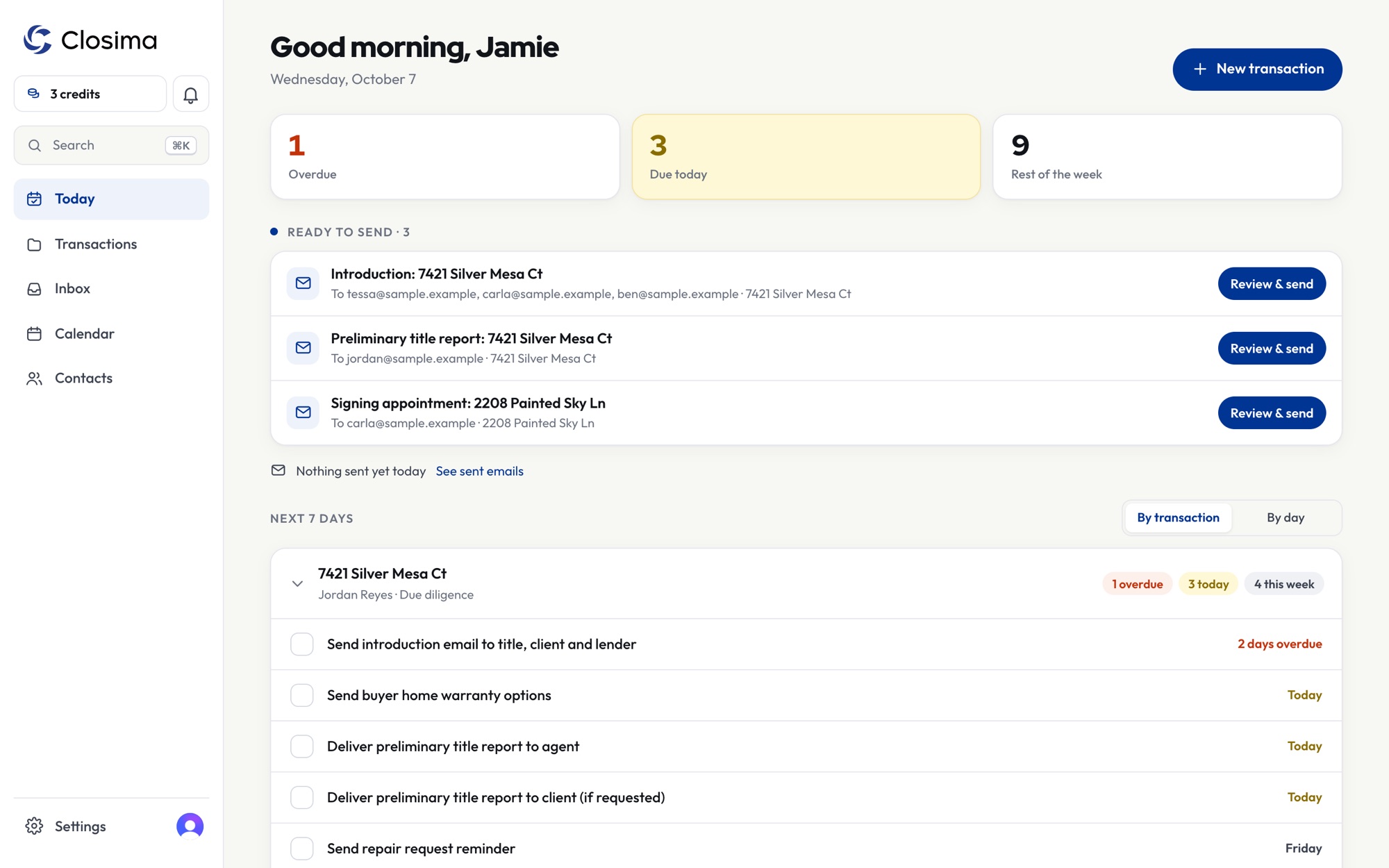
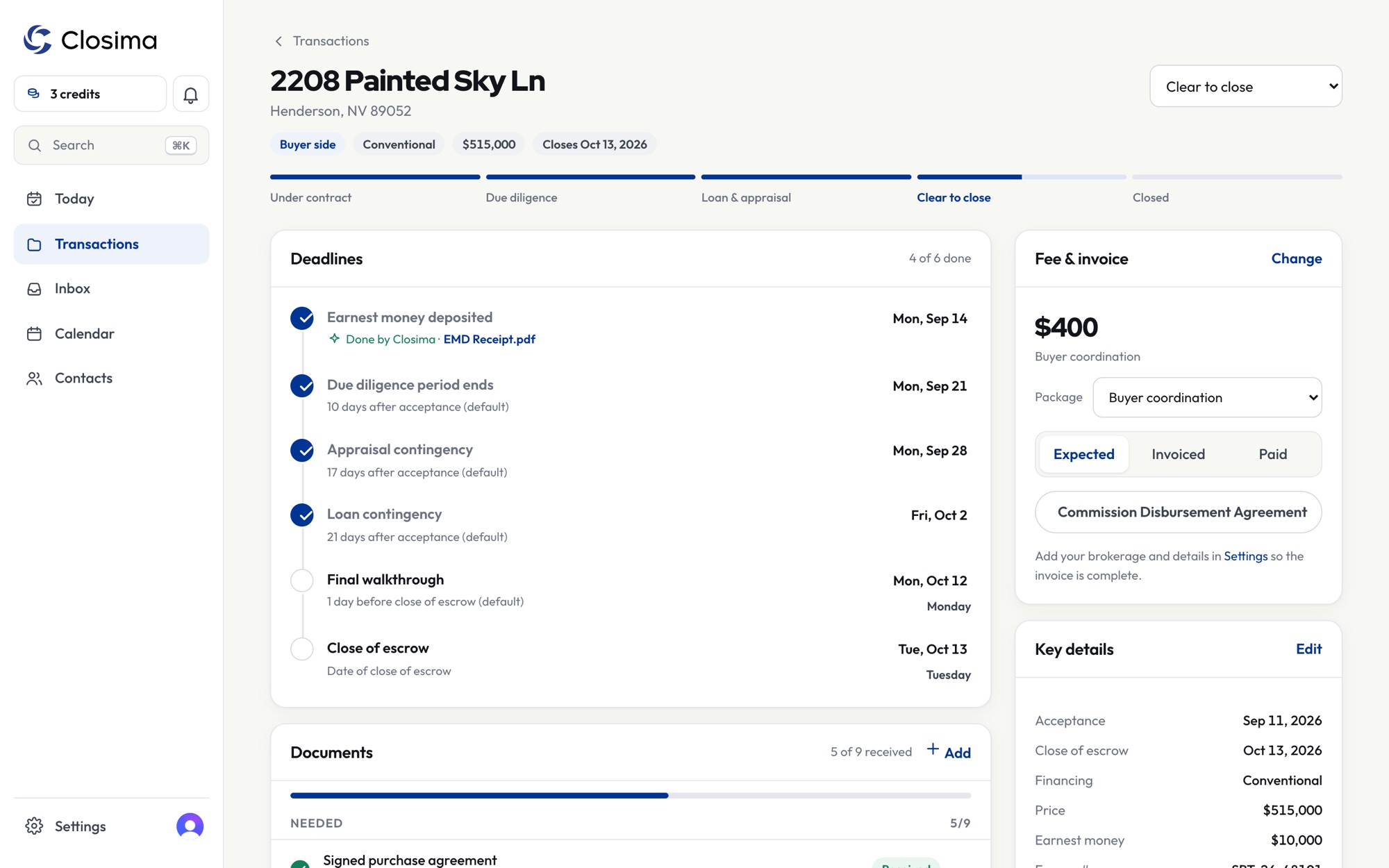
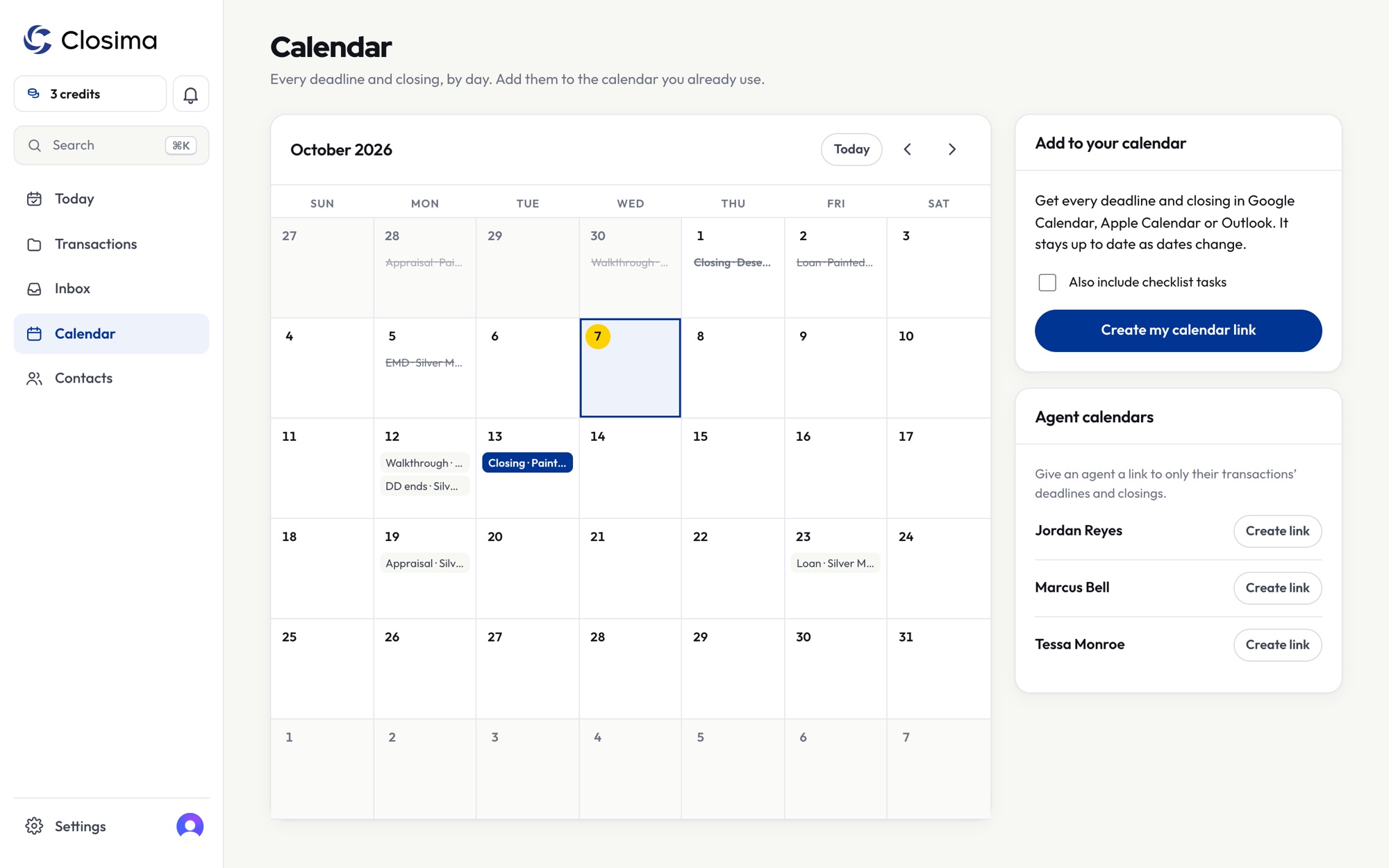
Start every morning knowing what's overdue, what's due today, and which emails are ready to send.
Everything a transaction coordinator juggles, in one place.
Your state's deadlines
Each state's contract timelines, business days and holidays, set up for you. Change a date and the rest recalculate. Syncs to Google, Apple or Outlook calendar.
Checklists you control
Start from listing and under-contract checklists written by a working TC, then make them your own.
Emails, drafted
A draft for every step, a 7am summary, and a Friday update for each agent. You review, then send.
Every nudge, counted
See how many times you've asked for each document, by email, call or text. Closima follows up when it doesn't arrive, then tells you it's time to call.
Never left off the thread
Your Closima address is copied on what you send. When people reply all, the reply and its attachments file themselves, even if they forget you.
Paid, however you're paid
A CDA for title, or an invoice to the agent or their brokerage. Every fee tracked until it's paid, with a reminder when one is late.
Agent portal
A private link for each agent to see where their files stand. No login, no "any update?" texts.
Forms and e-signatures
Your state's forms or your own, filled in from the file. Send them for signature, and the signed copy files itself.
Teams
Bring in an assistant or another TC. Everyone works the same files with their own login.
Agents see your business. Not your software.
Your logo and name go on every invoice, email and agent page. A small "Powered by Closima" line is on by default, and you can switch it off once you've bought credits.
- Invoices with your logo, fees and payment details
- Every fee tracked until you're paid, with a reminder when one is late
- Emails sent in your name
- Agent pages branded as your business
- Property
- 123 Maple St
- Closing
- April 10
- Payable to
- Your brokerage
Simple pricing. Pay per transaction.
Busy month or slow month, you only pay for the files you work.
- Your first 3 transactions are free
- Listings are free until they go under contract
- No monthly fee, no contracts
- E-signatures included
- Transaction falls through in the first 14 days? You get your credit back
Built next to a working TC, one real file at a time.
Closima started with one transaction coordinator in Las Vegas and the sticky notes, spreadsheets and calendar alerts every TC knows.
Every checklist, deadline rule and email comes from how real files move, and each state's rules are checked against that state's own contracts.
Good to know
Which states does Closima support?
All 50. Each state's standard contract timelines, business days and holidays are built in, and any date can be adjusted by hand for a specific file. See the deadlines for your state.
I already use TransactionDesk, Dotloop or SkySlope. Can I use Closima?
Yes. If your broker requires one of them, keep using it for the paperwork and forward the signed contract to Closima. If your broker doesn't, Closima can do the paperwork too: forms, e-signatures, and the complete file emailed to your broker. What software does a TC need?
What does a transaction cost?
$15, or as low as $8.98 with a credit pack. One credit covers one transaction from start to close, and listings are free until they go under contract. If a transaction falls through within its first 14 days, the credit goes back to your balance.
Will agents know I use Closima?
Only if you want them to. Invoices, emails and agent pages carry your name and logo. The small "Powered by Closima" line can be switched off once you've bought credits.
Is my clients' information safe?
Your files are private to your business and encrypted in transit. Sensitive documents are purged on a schedule, and everything is backed up every night.
Your next file, handled.
Your first 3 transactions are free. Forward or upload a contract and watch the deadlines fill in.
Start free →